27 August 2026
How to Choose a Laminator: A Practical Guide
Choose a laminator by matching its capacity to your workload, largest document size, available space and required finish. Light, occasional jobs may call for a compact machine, while continuous print production, specialist digital stock or oversized graphics require equipment built for greater speed, control and working width.
The right laminator should suit the work you produce now while providing enough flexibility for the jobs you are likely to handle in the future.
What Does Lamination Do?
Lamination bonds a clear film to printed material using heat, pressure or a combination of both. This protective layer may cover a single surface or encapsulate an item between two layers of film, depending on the machine, film and desired result.
Pouches provide a straightforward option for individual documents, while roll-fed systems support longer runs and a wider variety of formats. Correct film selection matters too: thickness, adhesive, finish and heat tolerance must all suit both the print and the machine.
Key Benefits of Lamination
- Protects print from moisture, fingerprints, dirt and routine handling.
- Extends the usable life of menus, signs, learning materials and display graphics.
- Adds a clean, professional finish in gloss, matt or specialist textures.
- Can improve rigidity, making frequently handled items easier to display or reuse.
- Keeps finishing work in-house, which can shorten turnaround times and reduce reliance on outsourcing.
What Types of Laminator Are Available?
Different laminating machines may appear similar, but their capabilities can vary considerably. Four of the main categories are pouch, roll, digital and wide-format laminators.
Pouch Laminators
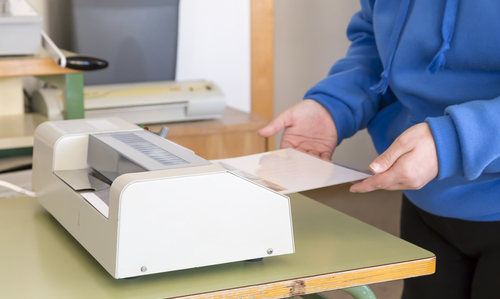
Pouch laminators laminate individual documents using pre-cut pouches, heat, and pressure. Straightforward controls and simple loading make these machines suitable for certificates, photographs, ID cards, business cards, menus and other smaller-format work, particularly where jobs are completed one item at a time.
Key Advantages:
- Simple to operate with minimal setup.
- Compact enough for desks or shared work areas.
- Accepts laminate pouches in various sizes, finishes and thicknesses.
- Well suited to occasional or moderate workloads.
Roll Laminators
Roll laminators feed films from continuous rolls rather than individual pouches. They are suited to repeated production, unusual lengths and a broad mix of document sizes, with thermal models applying controlled heat and pressure as material passes through the machine.
Key Advantages:
- Efficient during prolonged or repeated production runs.
- Can handle posters, maps, banners and smaller pieces.
- Continuous film provides flexibility across different job lengths.
- Many models provide adjustable speed and temperature controls.
Digital Laminators
Digital laminators are designed for digitally printed output, with equipment and compatible films available for different digital print applications.
Depending on the model and configuration, digital laminating systems may support single-sided work, duplex application, foiling or other decorative effects.
Key Advantages:
- Designed for the requirements of digitally printed output.
- Suitable for a range of digital print production requirements.
- Selected systems support foiling and other premium finishes.
- Automated feeding options can reduce manual intervention.
Wide-Format Laminators
Wide-format laminators are designed for larger printed materials such as posters, signs, graphics, banners and display work. Their increased working width allows them to process media that would not fit through smaller-format laminating equipment.
Available features and laminating methods vary between machines, so equipment should be compared against the materials, widths and applications you expect to handle.
Key Advantages:
- Suitable for larger-format print and graphics.
- Available in a range of working widths.
- Used for applications such as signage, displays, posters and banners.
- Different models support different laminating methods and applications.
How to Choose the Right Laminator: Questions to Ask
Begin with your actual workflow, including occasional jobs that fall outside normal production.
A cheaper machine can quickly become restrictive if it lacks sufficient width or capacity, while an oversized system may consume valuable space and budget without improving everyday output.
Where Will It Be Used?
A small office, school, university, print room and sign workshop each place different demands on laminating equipment.
Shared environments can benefit from clear controls, appropriate safety features and straightforward loading, while production environments tend to place greater emphasis on speed, repeatability and adjustment.
How Much Work Will It Handle?
Estimate both your average output and periods of peak demand.
The same overall volume can place different demands on equipment depending on whether work is spread throughout the day or produced in concentrated batches.
For regular production, consider equipment designed for sustained workloads rather than choosing solely on maximum sheet size.
How Quickly Does the Work Need to Be Finished?
Consider turnaround time as well as total volume.
Warm-up time, operating speed, feeding method and setup between jobs can all affect productivity. For frequent or time-sensitive work, compare operating speed, feeding options and continuous roll capacity where applicable.
What is the Largest Document Size?
Base your choice on the widest item you reasonably expect to laminate, rather than only today’s most frequent format.
An A3 machine can accept smaller sheets, for example, but an A4 laminator cannot process an occasional A3 poster.
Larger posters, banners, graphics and display materials may require a wide-format laminator with substantially greater working width.
Where Will the Machine Be Placed?
Measure the complete operating area before ordering.
Allow space not only for the machine itself but also for film rolls, feeders, take-up units, output trays and access panels where applicable. There should also be enough clearance to support material as it enters and leaves the laminator.
For larger systems, consider access for installation, servicing and routine maintenance as well.
Which Materials Will You Laminate?
List the materials likely to pass through the machine, including paper, card, coated stock, digitally printed sheets, photographs, vinyl, banners and heat-sensitive media.
Compatibility is particularly important because not every film, adhesive or operating temperature will suit every printed surface.
If you regularly handle heat-sensitive materials, it is also worth understanding the differences between hot and cold laminating before choosing a machine.
Which Finishes Do You Need?
Think about the appearance and performance required from the finished work.
Depending on the equipment and compatible film, options may include gloss, matt, soft-touch and other specialist finishes. You may also need single-sided lamination, encapsulation, mounting or decorative effects such as foiling.
Film specification can influence the appearance and performance of the finished work, so the required finish should form part of the machine-selection process rather than being considered afterwards.
Should You Buy a New or Used Laminator?
New equipment may provide current controls, automation, warranties and manufacturer support, but it isn’t the only option.
Carefully selected used laminating machines can provide access to higher-capacity equipment within a tighter capital budget.
When considering pre-owned equipment, check that its specifications and condition suit your requirements, and ask about its service history and available support.
Choosing a Laminator for Your Workload
There is no single laminator that is right for every organisation.
A school or office occasionally laminating A4 and A3 documents has very different requirements from a commercial printer handling regular digital print production or a sign business finishing wide-format graphics.
As a general guide:
- A pouch laminator may be suitable if you mainly laminate individual documents, need straightforward operation and have relatively light or moderate workloads.
- A roll laminator may be suitable if you process repeated batches, longer materials or different document sizes and want the efficiency of continuous film.
- A digital laminator may be suitable if you regularly finish digitally printed output and require greater control, automation or specialist finishing options.
- A wide-format laminator may be suitable if you produce posters, signage, graphics, banners, or other oversized work that requires greater working width.
The best choice should ultimately balance what you laminate, how often you laminate it, how quickly the work needs to be completed and the finish your customers or users expect.
Why Choose AfterPrint?
Choosing the right laminator depends on your print process, working width, production volume and required finish.
With more than 50 years of combined print-finishing experience, AfterPrint can help you consider film compatibility, operating speed, available space and consumable requirements before investing.
Explore our range of new and used laminating machines, including pouch, roll-fed, digital and wide-format systems online, or contact us today for friendly, professional advice and help finding the right laminating solution for your needs.